
Activity Log
Drag and drop
Click a card and drag it anywhere — up or down in its beat, into another beat or act, or into the Unassigned column. As you drag, an orange bar shows where the card will land.
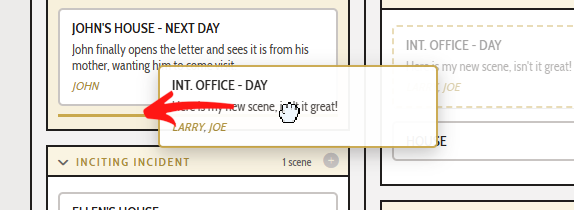
Let go, and it is there — saved at once.
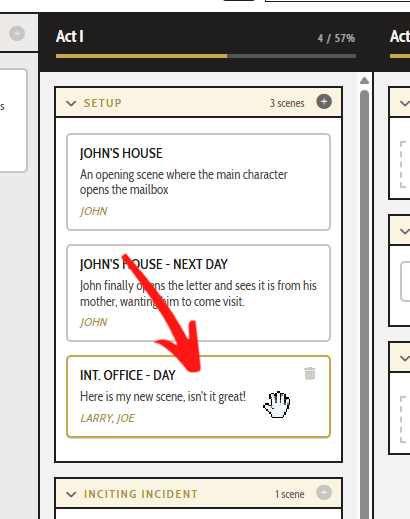
- Drop a card on the top half of another card to put it above, or the bottom half to put it below.
- Changed your mind? The Undo arrow beside the board’s title puts the last move back.
- On a phone or tablet, drag a card by the small grip on its left, so the board still scrolls when you swipe.
- Moving a card on one board does not move it on any other board — each board keeps its own arrangement.
Loading content...
Loading screenplays…
Loading members…
Loading coverage…
Loading posts…
Education
Webinars and articles on the craft and business of screenwriting, from Script 360 and writers who know the work.
Loading webinars…
Loading articles…
Attachments/Media
The tabs in this section are currently hidden. Click on any of the tab titles above to open one.
| Title | Size | Uploaded | Actions |
|---|
No Attachments
No Images
No Videos
No Audio Files
Series / World
For a TV series, or a film and its sequels: keep the characters and locations that recur here, and every script you add to the folder can bring them in.
The tabs in this section are currently hidden. Click on any of the tab titles above to open one.
Scripts
Attachments/Media
The tabs in this section are currently hidden. Click on any of the tab titles above to open one.
| Title | Size | Uploaded | Actions |
|---|
No Attachments
No Images
No Videos
No Audio Files