
Activity Log
Follow a subplot, a theme or a set piece through the whole story
Tags are your own labels: a name and a colour each, like Heist, Romance or Flashback. Every tag on a scene shows as a small coloured chip on its card.
A story’s tags are shared by all of its boards, so a tag made on one board is there on the others.
Making and using tags
- In a scene’s popup, use Add a tag… to put a tag on the scene, or choose New tag… to make one: give it a name, pick a colour, and it is added to the scene.
- Or open the Tags menu at the top of the board and choose Add Tag.
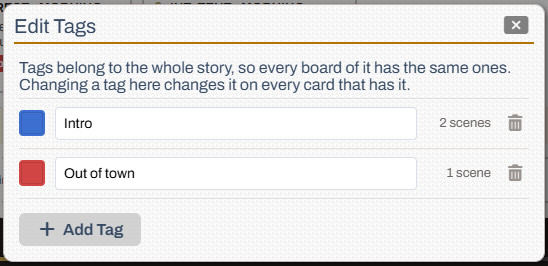
- Edit Tags in the same menu lets you rename a tag, change its colour, see how many scenes use it, or delete it. Deleting a tag takes it off every scene that has it, but leaves the scenes as they are.
Filtering the board
Open the Tags menu and tick one or more tags. The board then shows only the scenes with any of those tags, so you can follow one thread from the first act to the last. A bar under the header says how many scenes are showing; press Show all scenes to see everything again.
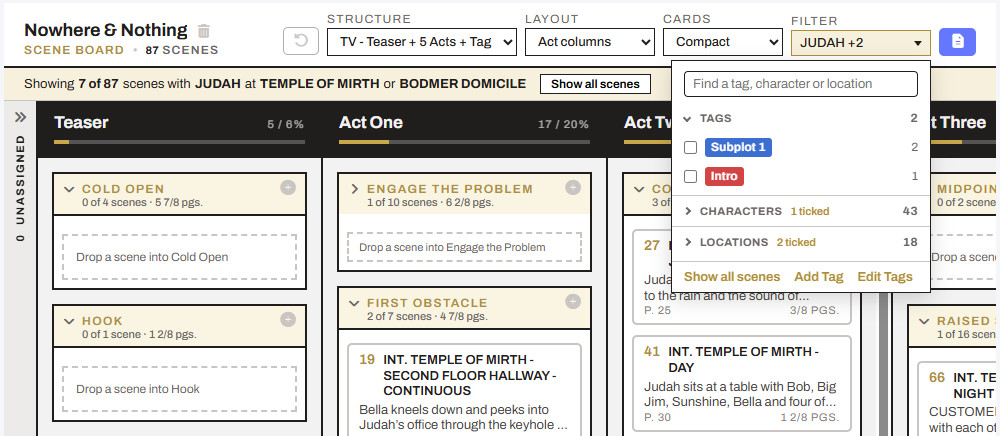
- The acts and beats stay where they are, so you can still see where the thread falls in the story.
- You can keep moving cards while the board is filtered. A card dropped above another lands right above it, and the hidden cards stay exactly where they were.
- A scene you add while filtering already has the filtered tags, so it does not vanish when you save it.
- The filter is remembered in your browser for each board, and nobody else sees it.
Tags in your screenplay
In the editor, a tagged scene shows a small coloured square for each tag after its scene heading, and its tags appear in the Scene Navigator too. Hover over the squares to see the tags’ names.
Loading content...
Loading screenplays…
Loading members…
Loading coverage…
Loading posts…
Education
Webinars and articles on the craft and business of screenwriting, from Script 360 and writers who know the work.
Loading webinars…
Loading articles…
Attachments/Media
The tabs in this section are currently hidden. Click on any of the tab titles above to open one.
| Title | Size | Uploaded | Actions |
|---|
No Attachments
No Images
No Videos
No Audio Files
Series / World
For a TV series, or a film and its sequels: keep the characters and locations that recur here, and every script you add to the folder can bring them in.
The tabs in this section are currently hidden. Click on any of the tab titles above to open one.
Scripts
Attachments/Media
The tabs in this section are currently hidden. Click on any of the tab titles above to open one.
| Title | Size | Uploaded | Actions |
|---|
No Attachments
No Images
No Videos
No Audio Files