
Activity Log
Typing or pressing Enter searches the topics for your words.
Moving cards and making groups
Moving cards
- Drag a card to an empty spot and it stays there. Nothing else moves.
- Drop a card on the top or bottom edge of another card and it goes in above or below it. The cards in that column move down to make room.
- Drop it on the left or right side of a card and it goes in beside it. The cards in that row move over.
- Cards only move as far as the next empty spot, so a group further along stays right where you put it.
- Drag a card back to the Unassigned column to take it off the board.
- Changed your mind? Undo puts every card back, including any that were pushed along.
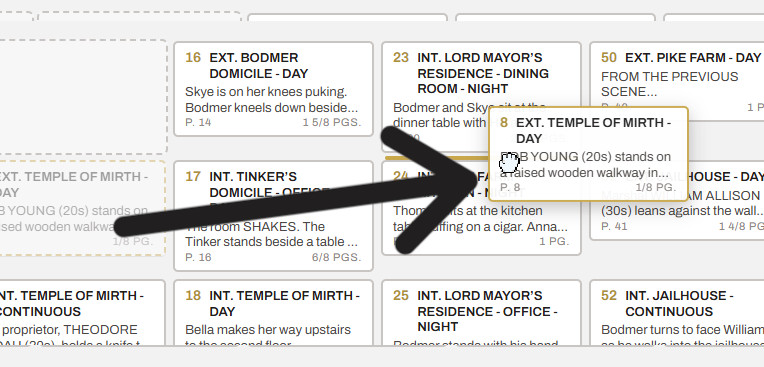
Here scene 8 is dropped on the top edge of scene 24. The gold line shows where it will go:
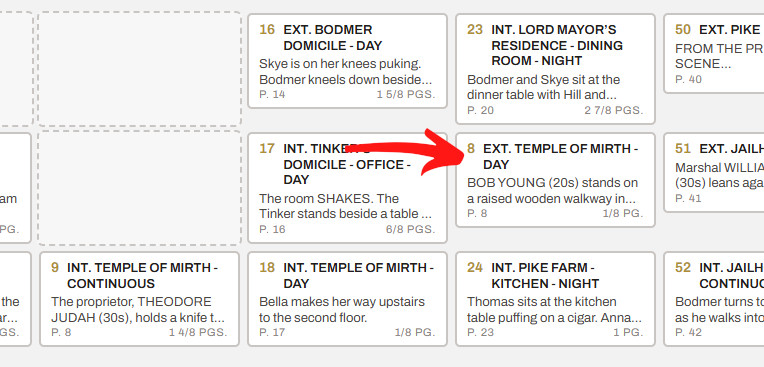
Scene 8 takes that spot, and scene 24 and the cards under it move down one:
Adding a card
Point at an empty spot and click the +. The new card goes right there.
Naming your groups
The Headers menu at the top of the board decides where your group names go:
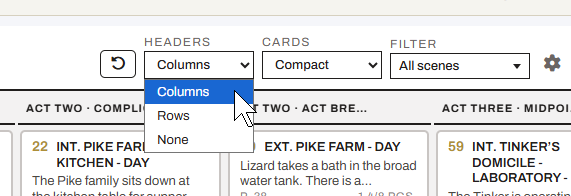
- Columns puts the names across the top.
- Rows puts them down the left side. Switching between Columns and Rows turns the whole board, so each group keeps its name and its cards.
- None shows no names at all, just your cards. Your names are kept, and they come back if you switch again.
Click the pencil on a heading to give it a name and a color. The + beside it adds an empty column (or row), and the trash can removes one that’s empty. The Filter menu and your scene tags work just as they do on a Beat Board.
Writing a script from a Corkboard
In an idea, Create script asks which way to read your Corkboard: down the columns, or across the rows. Any cards still in the Unassigned column can go at the end. The new script gets its own Beat Board, with every scene waiting in its Unassigned column for you to place.
Your screenplay’s Corkboard
A card you add on your script’s Corkboard also shows up in the Unassigned column of your Beat Board. It’s a note for you, not a scene in your script, because nothing on a Corkboard ever changes your screenplay. Choosing Scene Boards in the editor, or on your script’s page, opens whichever board you used last.
Back to: What is a Corkboard?
Loading content...
Loading screenplays…
Loading members…
Loading coverage…
Loading posts…
Education
Webinars and articles on the craft and business of screenwriting, from Script 360 and writers who know the work.
Loading webinars…
Loading articles…
Attachments/Media
The tabs in this section are currently hidden. Click on any of the tab titles above to open one.
| Title | Size | Uploaded | Actions |
|---|
No Attachments
No Images
No Videos
No Audio Files
Series / World
For a TV series, or a film and its sequels: keep the characters and locations that recur here, and every script you add to the folder can bring them in.
The tabs in this section are currently hidden. Click on any of the tab titles above to open one.
Scripts
Ideas
Attachments/Media
The tabs in this section are currently hidden. Click on any of the tab titles above to open one.
| Title | Size | Uploaded | Actions |
|---|
No Attachments
No Images
No Videos
No Audio Files