
Activity Log
Changing your screenplay’s details
Click the gear at the top right of the screenplay’s summary page, or the gear beside it in your Screenplays list, and choose Edit Script Info. That opens the Edit Script popup:
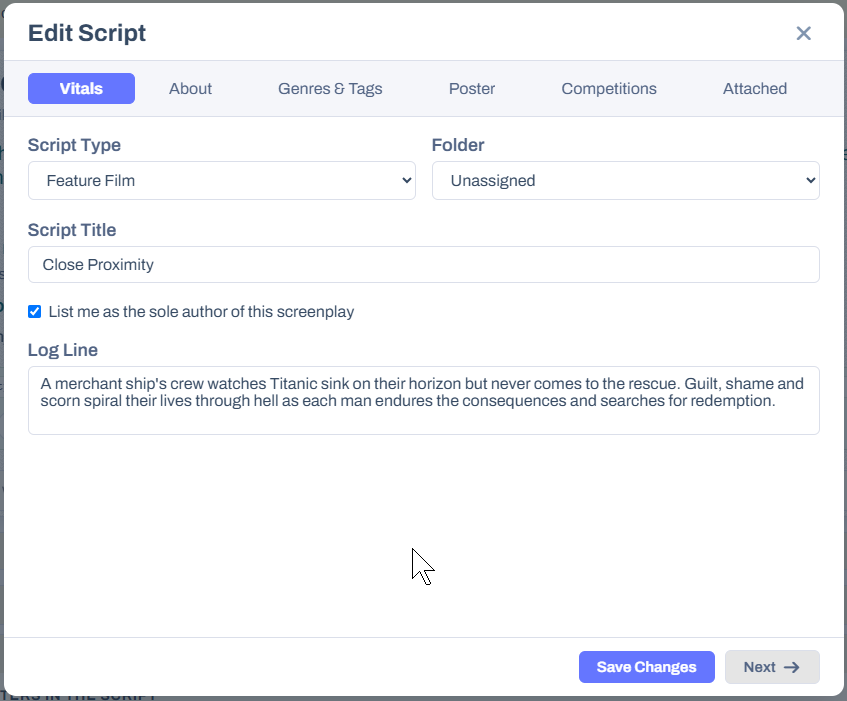
It has the same steps you filled in when you created the screenplay, as tabs across the top. Click any tab to go straight to it:
- Vitals — the script type, the folder it is filed in, the title, the writers and the log line. A TV script also has its season, episode number, episode title and episode summary here.
- About — the story synopsis, your author’s notes and the screenplay’s IMDb page, if it has one.
- Genres & Tags — up to three genres, and up to ten tags.
- Poster — upload your own image, choose one of ours, or keep the one you have.
- Competitions — contests and festivals the screenplay has placed in.
- Attached — producers, directors, actors and anyone else attached to the project.
Click Save Changes from any tab. You don’t have to go through all of them.
An episode in a Series folder takes its title, type and genres from the series, so those are locked here; see What is special about Series folders?
Changing the screenplay itself
Edit Script Info changes the details about your screenplay, never its pages. To write, click Edit Script at the top right of the summary page. To bring in a newer version you wrote somewhere else, use Upload a New Draft on the same gear menu; see Can I upload a new draft of my script that I edited in other screenwriting software?
Loading content...
Loading screenplays…
Loading members…
Loading coverage…
Loading posts…
Education
Webinars and articles on the craft and business of screenwriting, from Script 360 and writers who know the work.
Loading webinars…
Loading articles…
Attachments/Media
The tabs in this section are currently hidden. Click on any of the tab titles above to open one.
| Title | Size | Uploaded | Actions |
|---|
No Attachments
No Images
No Videos
No Audio Files
Series / World
For a TV series, or a film and its sequels: keep the characters and locations that recur here, and every script you add to the folder can bring them in.
The tabs in this section are currently hidden. Click on any of the tab titles above to open one.
Scripts
Ideas
Attachments/Media
The tabs in this section are currently hidden. Click on any of the tab titles above to open one.
| Title | Size | Uploaded | Actions |
|---|
No Attachments
No Images
No Videos
No Audio Files