
Activity Log
Bring in a newer version of your screenplay
Kept working on a screenplay somewhere else, in Final Draft or another app? You don’t need to create it here all over again. Upload the new file to the screenplay you already have, and it becomes that screenplay’s next draft.
Where to find it
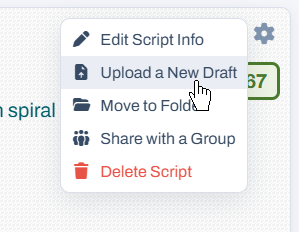
Click the gear at the top right of the screenplay’s summary page and choose Upload a New Draft. The same choice is on the gear beside each screenplay in your Screenplays list on the Dashboard and in your folders.
The Upload a New Draft popup
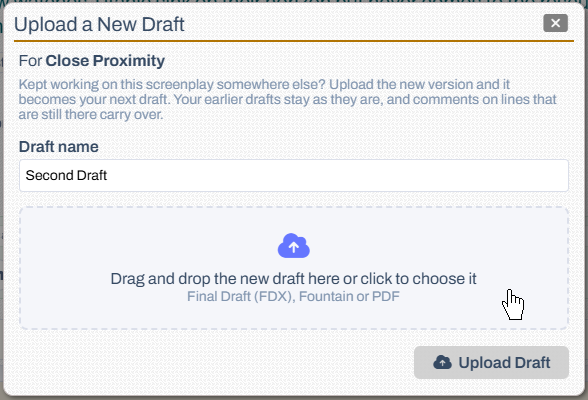
- Draft name — filled in with the next name in line, such as Second Draft. Keep it, or type your own.
- The upload box — click it to choose the file, or drag the file from your desktop and drop it there. It must be a Final Draft (FDX), Fountain or PDF file. FDX gives the most complete import; see What script formats can I import?
- Make it the published copy too — shown once you have chosen a file, when the screenplay already has a published copy. It starts ticked, so the people you have invited to read move straight to the new draft. Untick it to keep them on the copy they have while you work on this one. If nothing is published yet, it says Publish it now instead and starts unticked.
Then click Upload Draft.
What happens to what you already have
- Nothing is replaced. Your earlier drafts stay exactly as they were, and you can switch back to any of them.
- Comments carry over. Each line of the new draft is matched to the draft before it. Comments, scene cards and pictures on a line that is still there come across with it. Lines you cut keep their comments in the drafts that still have them.
- The details stay as they are. The title, log line, poster, genres and everything else about the screenplay are not touched. To change those, see How do I change my screenplay’s title, logline, poster or other details?
After you click Upload Draft
The new draft is laid out page by page to work out its length and where each scene falls. You will see a Preparing your new draft message while that happens — a few moments on a long script. Then a message tells you the name of the new draft and how many of its lines matched your last draft.
The new draft is now the one you are working on: Edit Script opens it. Your other drafts are in the Drafts section of the summary page and in the editor’s Drafts menu.
Who can upload a draft, and how many
The screenplay’s author and its co-authors can. Each new draft counts toward your membership’s drafts per screenplay (one on Free, three on Basic, six on Pro), and if a screenplay already has as many as your membership allows, the popup tells you before you choose a file. There is more about drafts in Can I create (and edit) multiple drafts of my script?
Loading content...
Loading screenplays…
Loading members…
Loading coverage…
Loading posts…
Education
Webinars and articles on the craft and business of screenwriting, from Script 360 and writers who know the work.
Loading webinars…
Loading articles…
Attachments/Media
The tabs in this section are currently hidden. Click on any of the tab titles above to open one.
| Title | Size | Uploaded | Actions |
|---|
No Attachments
No Images
No Videos
No Audio Files
Series / World
For a TV series, or a film and its sequels: keep the characters and locations that recur here, and every script you add to the folder can bring them in.
The tabs in this section are currently hidden. Click on any of the tab titles above to open one.
Scripts
Ideas
Attachments/Media
The tabs in this section are currently hidden. Click on any of the tab titles above to open one.
| Title | Size | Uploaded | Actions |
|---|
No Attachments
No Images
No Videos
No Audio Files