
Activity Log
On the Scene Snippets page
Click Scene Snippets in the dashboard’s sidebar. Every snippet you have is listed on the left, and the one you pick opens on the right to read and work on, with no script needed.
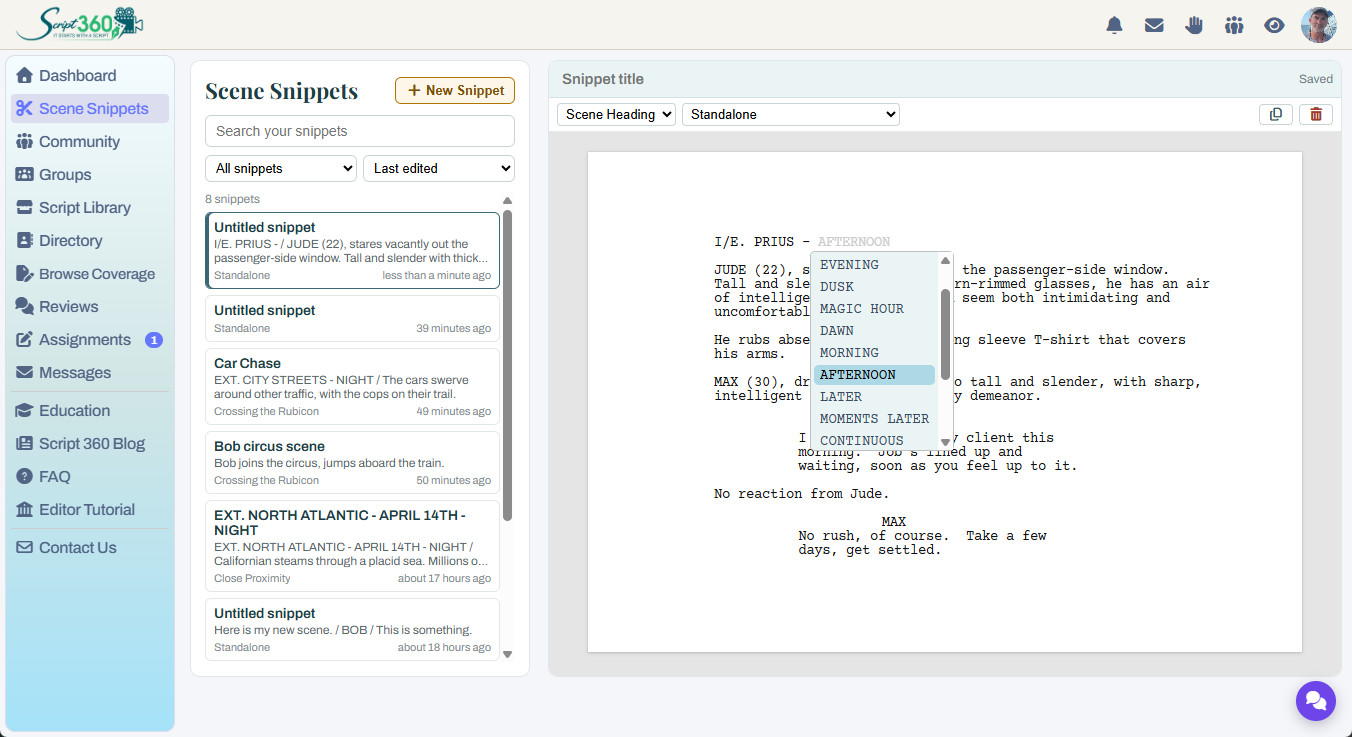
- Search looks through titles, the words of each snippet and script names.
- Show All snippets, only the Standalone ones, or the snippets of one script.
- Sort by Last edited, Title or Script.
- New Snippet starts one from scratch. It stands alone, unless you are looking at one script’s snippets, when it is filed under that script.
Everything else works as it does in the editor: the same keys, saving as you type, File under, copy and delete. A snippet filed under a script has an Open script link to go to its screenplay.
In the editor, the Scene Snippets panel has a link to this page too: All your snippets on one page.
Loading content...
Loading screenplays…
Loading members…
Loading coverage…
Loading posts…
Education
Webinars and articles on the craft and business of screenwriting, from Script 360 and writers who know the work.
Loading webinars…
Loading articles…
Attachments/Media
The tabs in this section are currently hidden. Click on any of the tab titles above to open one.
| Title | Size | Uploaded | Actions |
|---|
No Attachments
No Images
No Videos
No Audio Files
Series / World
For a TV series, or a film and its sequels: keep the characters and locations that recur here, and every script you add to the folder can bring them in.
The tabs in this section are currently hidden. Click on any of the tab titles above to open one.
Scripts
Attachments/Media
The tabs in this section are currently hidden. Click on any of the tab titles above to open one.
| Title | Size | Uploaded | Actions |
|---|
No Attachments
No Images
No Videos
No Audio Files