
Activity Log
Filed under a script, or on its own
Script snippets
A snippet filed under one of your screenplays takes that script’s look and its names:
- Its elements are laid out with the script’s Element Settings.
- When you type a character name or a scene heading, SmartType suggests the script’s characters and locations.
- In the editor, it is listed in the Scene Snippets panel under This script.
Writing a snippet never changes the script. A new character you invent in a snippet is not added to the script’s character list, so trying out an idea leaves your script exactly as it was.
Standalone snippets
A standalone snippet is not filed under any script, and uses the standard screenplay layout. SmartType suggests the names you have already used in that snippet, so a character only has to be typed once.
In the editor, standalone snippets are listed under Standalone, whichever script you have open.
Moving a snippet
Use the File under list at the top of the snippet to file it under any of your scripts, or choose Standalone to take it out of any script. Its layout and SmartType names change to match straight away.
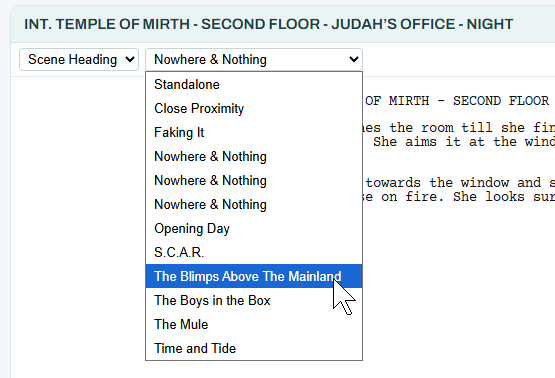
A new snippet made with New Snippet in the editor is filed under the script you have open, unless you are looking at the Standalone list.
If you delete the script
The snippets filed under it go with it. To keep one, move it to Standalone or to another script first.
Loading content...
Loading screenplays…
Loading members…
Loading coverage…
Loading posts…
Education
Webinars and articles on the craft and business of screenwriting, from Script 360 and writers who know the work.
Loading webinars…
Loading articles…
Attachments/Media
The tabs in this section are currently hidden. Click on any of the tab titles above to open one.
| Title | Size | Uploaded | Actions |
|---|
No Attachments
No Images
No Videos
No Audio Files
Series / World
For a TV series, or a film and its sequels: keep the characters and locations that recur here, and every script you add to the folder can bring them in.
The tabs in this section are currently hidden. Click on any of the tab titles above to open one.
Scripts
Attachments/Media
The tabs in this section are currently hidden. Click on any of the tab titles above to open one.
| Title | Size | Uploaded | Actions |
|---|
No Attachments
No Images
No Videos
No Audio Files