
Activity Log
Loading content...
Real time Collaboration
Edit in real time with others!
When collaborating, multiple editors can make changes to the script (at the same time or not)
Like all collaboration, different folks editing a script might be working on the script at the same time, or not. Either way, all changes made by anyone are saved immediately, so if you log in and edit a collaborative script, changes made by others will show up immediately, whether they are online or not.
Remember, inviting others to edit a script is draft related, meaning that it might make sense to create a private (non-shared) draft of the script for your own editing, preserving a specific draft for editing by you and others you hav einvited. By doing that, you can decide later which changes to copy over and which to ignore.
To know if others are also editing in real time...
When you edit a collaborative script, the site will check to see if any collaborators are currently editing the same script, showing a round icon in the bottom-right corner of the window for every active, online editor:
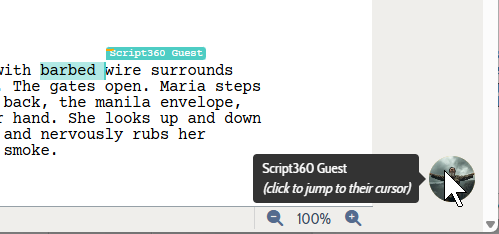
Note the label (and the selected text with a blue background) in the image above. A label with the other person's name will appear in your editor that shows the other person's cursor position or selection. They click, they type, they delete or cut or copy, it updates immediately.
In the case where the other person is not on the same page you are viewing on screen, just click on the round icon and you will be scrolled right to wherever they are editing, allowing you to view their changes as they are made.
Loading screenplays…
Loading members…
Loading coverage…
Loading posts…
Education
Webinars and articles on the craft and business of screenwriting, from Script 360 and writers who know the work.
Loading webinars…
Loading articles…
Attachments/Media
The tabs in this section are currently hidden. Click on any of the tab titles above to open one.
| Title | Size | Uploaded | Actions |
|---|
No Attachments
No Images
No Videos
No Audio Files
Series / World
For a TV series, or a film and its sequels: keep the characters and locations that recur here, and every script you add to the folder can bring them in.
The tabs in this section are currently hidden. Click on any of the tab titles above to open one.
Scripts
Attachments/Media
The tabs in this section are currently hidden. Click on any of the tab titles above to open one.
| Title | Size | Uploaded | Actions |
|---|
No Attachments
No Images
No Videos
No Audio Files